
Main Menu
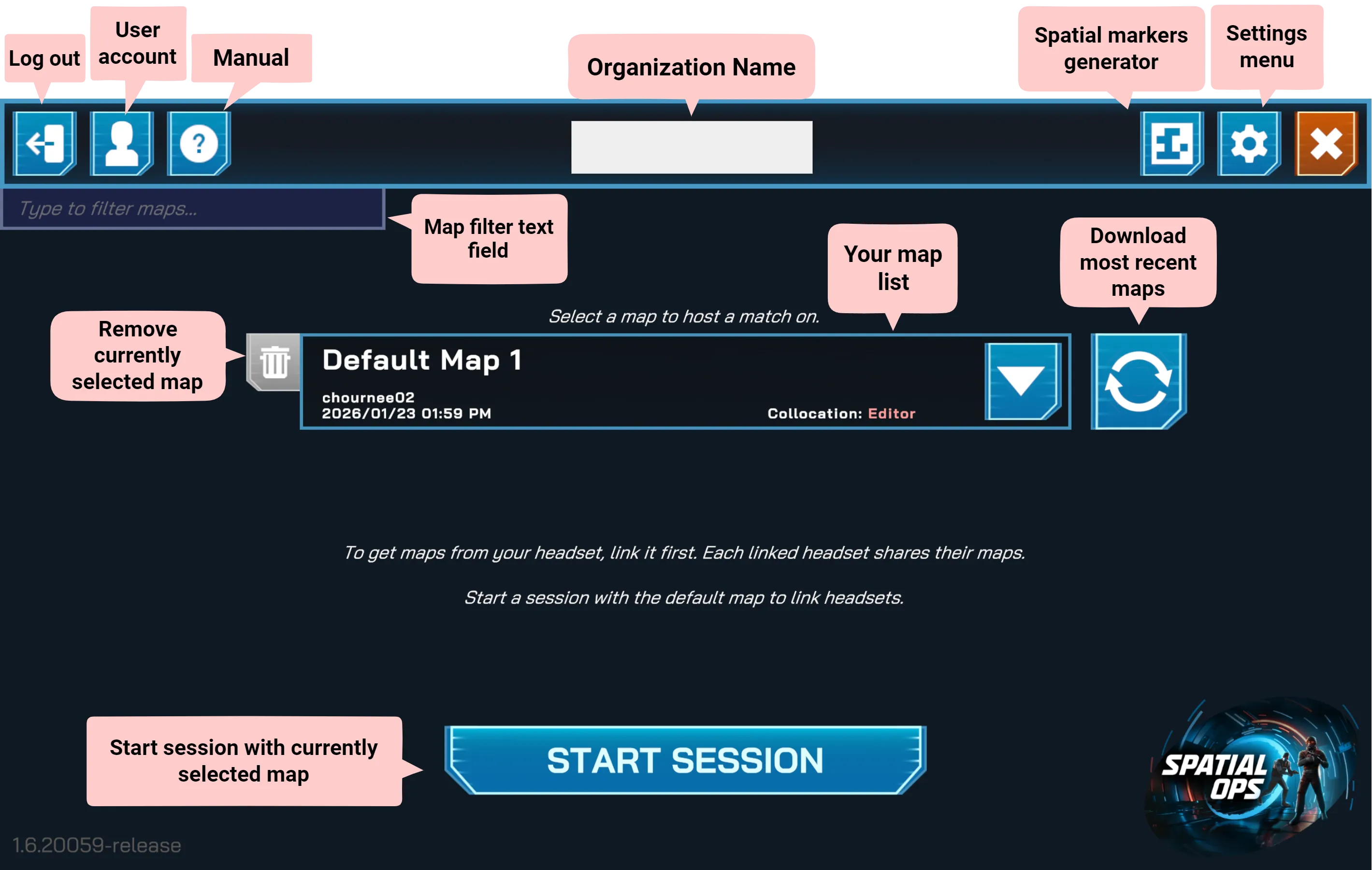
The Main Menu is the starting point for all operations in Spatial Ops Manager. From here you can select maps, manage your organization, and configure essential settings.
Top Bar Controls
Section titled “Top Bar Controls”- Log out — sign out of your current account.
- User account — view details of the logged-in user.
- Manual — open the documentation for Spatial Ops Manager.
- Organization name — displays the name of the organization currently logged in.
- Spatial markers generator — open the tool to generate and print spatial markers for arena setup.
- Settings menu
- Close Application — exit the Manager app.
Map Management
Section titled “Map Management”- Maps List — view and select maps available to your organization. Linked headsets automatically share their maps with the Manager app.
- Download Most Recent Maps — refresh to fetch updated maps from linked headsets.
- Remove Map — delete the currently selected map from the Manager app.
- Map Filter text field — helps you search for specific maps to manage.
Session Control
Section titled “Session Control”- Start Session — begin a session using the currently selected map. Use this option to link headsets or prepare for a match.