

Data Import and Export
This section covers data operations available as advanced features in the Manager app, allowing integration with third-party systems.
Export
Section titled “Export”The export feature currently supports match live data and match results. Once enabled, data is exported automatically, either as a file or as an HTTP endpoint. Live match data streams during the match, and match results are only exported once the match ends.
In the Settings Menu > Advanced, select which data to enable and the delivery mode — HTTP, File, or both. Choosing neither mode will disable the export for that data type.
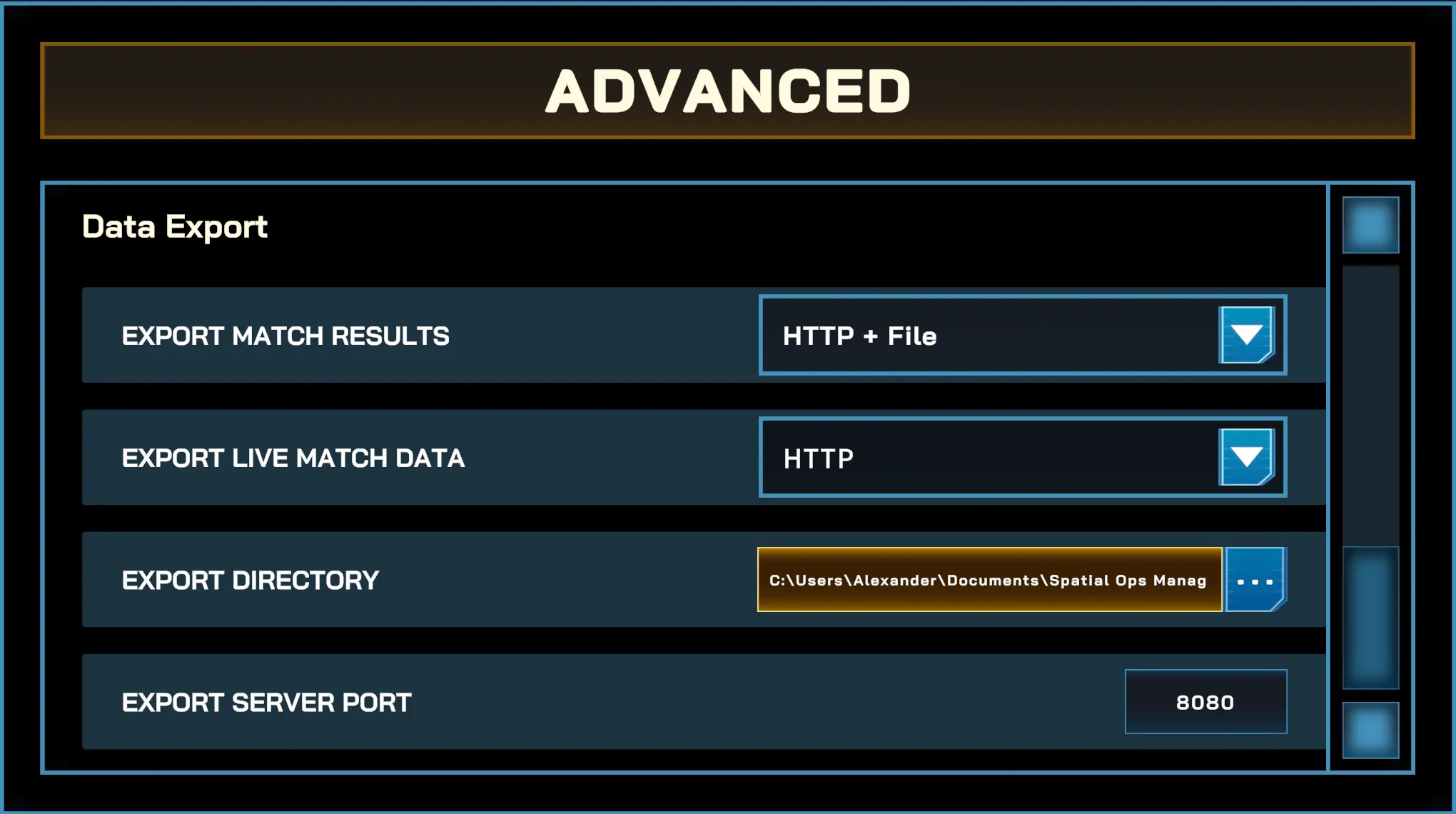
Additional export settings
Section titled “Additional export settings”- Export directory — set this to the directory where the files would be generated (only enabled when File mode is enabled)
- Export server port — set this to the port of the local HTTP server. Data can be fetched through the IP Address of the computer running the manager, alternatively through
http://127.0.0.1:[port]orhttp://localhost:[port](only enabled when HTTP mode is enabled)
HTTP Endpoints
Section titled “HTTP Endpoints”The HTTP server exposes the following endpoints. Accessing http://[IP Address]:[port] directly without an endpoint will not return any data.
- /matchstats — match result (e.g.
http://127.0.0.1:7770/matchstats) - /matchsnapshot — live match update (e.g.
http://127.0.0.1:7770/matchsnapshot)
Data Format
Section titled “Data Format”Both delivery modes (HTTP and File) export a JSON format with the following structure:
{ "matchId": "string", "gameMode": "string - e.g. FreeForAll, TeamDeathMatch", "lifeMode": "string - i.e. IndividualLives, TeamLives, Permadeath, Unlimited", "matchStartTimestamp": "string", "lastUpdateTimestamp": "string", "waveIndex": "integer", "playerMaxLives": "integer", "teamMaxLives": "integer", "team1Deaths": "integer", "team2Deaths": "integer", "team1Score": "integer", "team2Score": "integer", "playerStats": [ { ...player stats... }, { ...player stats... } ]}Each entry in the playerStats array represents a single player’s data for the match:
{ "playerName": "string", "team": "integer", "kills": "integer", "deaths": "integer", "assists": "integer", "objectives": "integer", "score": "integer", "isBot": "boolean"}Example (Team Deathmatch)
Section titled “Example (Team Deathmatch)”{ "matchId": "967db9a6-c147-4a0d-847a-f81d1748d74e", "gameMode": "TeamDeathMatch", "lifeMode": "Unlimited", "matchStartTimestamp": "2026-04-20T09:36:46.3080694Z", "lastUpdateTimestamp": "2026-04-20T09:37:35.4588344Z", "waveIndex": 0, "playerMaxLives": 0, "teamMaxLives": 0, "team1Deaths": 15, "team2Deaths": 3, "team1Score": 300, "team2Score": 1500, "playerStats": [ { "playerName": "Player1", "team": 2, "kills": 11, "deaths": 0, "assists": 1, "objectives": 0, "score": 1100, "isBot": false }, { "playerName": "RYAN", "team": 2, "kills": 4, "deaths": 1, "assists": 3, "objectives": 0, "score": 400, "isBot": true }, { "playerName": "Player2", "team": 1, "kills": 1, "deaths": 2, "assists": 0, "objectives": 0, "score": 100, "isBot": false }, { "playerName": "CREED", "team": 1, "kills": 1, "deaths": 4, "assists": 0, "objectives": 0, "score": 100, "isBot": true }, { "playerName": "TOBY", "team": 1, "kills": 1, "deaths": 4, "assists": 0, "objectives": 0, "score": 100, "isBot": true }, { "playerName": "CASSANDRA", "team": 1, "kills": 0, "deaths": 5, "assists": 1, "objectives": 0, "score": 0, "isBot": true }, { "playerName": "MOBILISTIC", "team": 2, "kills": 0, "deaths": 1, "assists": 1, "objectives": 0, "score": 0, "isBot": true }, { "playerName": "BOB", "team": 2, "kills": 0, "deaths": 1, "assists": 1, "objectives": 0, "score": 0, "isBot": true } ]}Example (Free For All)
Section titled “Example (Free For All)”{ "matchId": "9c241d47-f5d5-41a9-a24b-a10d45a4ceab", "gameMode": "FreeForAll", "lifeMode": "Unlimited", "matchStartTimestamp": "2026-04-20T09:28:44.7204451Z", "lastUpdateTimestamp": "2026-04-20T09:30:20.7515251Z", "waveIndex": 0, "playerMaxLives": 0, "teamMaxLives": 0, "team1Deaths": 0, "team2Deaths": 0, "team1Score": 0, "team2Score": 0, "playerStats": [ { "playerName": "Player1", "team": -1, "kills": 14, "deaths": 6, "assists": 6, "objectives": 0, "score": 1400, "isBot": false }, { "playerName": "TOBY", "team": -4, "kills": 11, "deaths": 7, "assists": 6, "objectives": 0, "score": 1100, "isBot": true }, { "playerName": "Player2", "team": -2, "kills": 6, "deaths": 7, "assists": 5, "objectives": 0, "score": 600, "isBot": false }, { "playerName": "BOB", "team": -3, "kills": 5, "deaths": 6, "assists": 4, "objectives": 0, "score": 500, "isBot": true }, { "playerName": "MOBILISTIC", "team": -5, "kills": 5, "deaths": 4, "assists": 3, "objectives": 0, "score": 500, "isBot": true }, { "playerName": "HANNAH", "team": -6, "kills": 4, "deaths": 7, "assists": 0, "objectives": 0, "score": 400, "isBot": true }, { "playerName": "OSCAR", "team": -7, "kills": 2, "deaths": 6, "assists": 9, "objectives": 0, "score": 200, "isBot": true }, { "playerName": "RYAN", "team": -8, "kills": 2, "deaths": 6, "assists": 0, "objectives": 0, "score": 200, "isBot": true } ]}Testing and Troubleshooting
Section titled “Testing and Troubleshooting”-
File Mode — Navigate to the export directory and verify JSON files are being generated during and after the match.
- If no files generated — check that the directory path is valid.
-
HTTP Mode — Open a browser and navigate to
http://127.0.0.1:[port]/<selected_endpoint>. You should see the exported JSON data. To access from another device on the same network, usehttp://[computer IP address]:[port]/<selected_endpoint>instead.- Cannot access
http://127.0.0.1:[port]orhttp://[IP address]:[port]— verify the correct port is configured and not in use by another application. Also check if the Manager app is granted firewall access during installation.

- Cannot access
Import
Section titled “Import”The import feature currently supports player name assignment. In the Settings Menu > Advanced, set Import Player Names to either File or HTTP to enable it, or Disabled to turn it off.
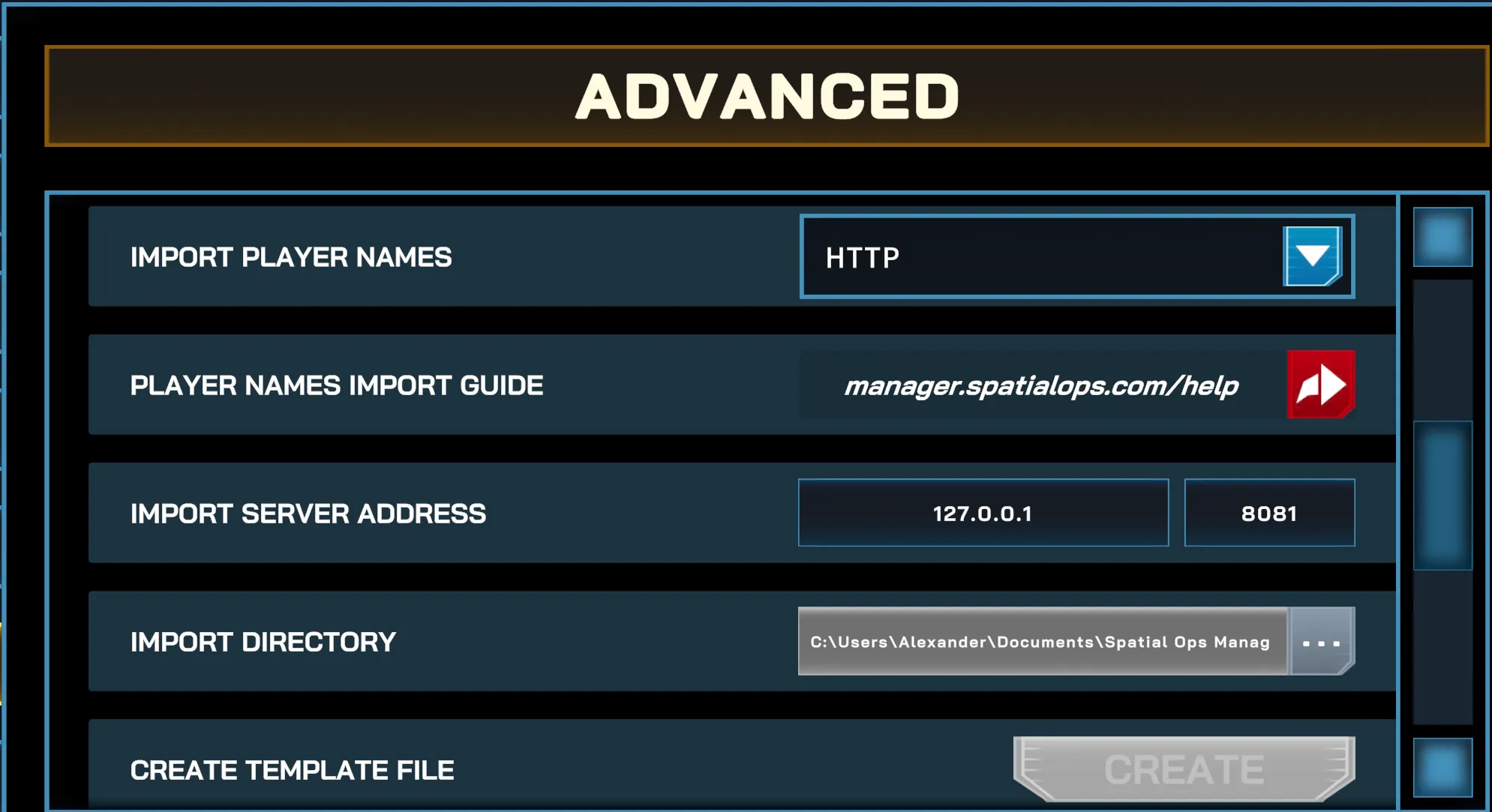
Once the setting is enabled, a button will appear on the session panel to trigger the import. It is recommended to trigger the players’ update before starting a match.

Additional Import Settings
Section titled “Additional Import Settings”-
Import Server Address — set this to the IP Address and Port of the HTTP endpoint providing the player names (only enabled when Import Mode is HTTP).
-
Import Directory — set this to the directory where the App Manager will get
playernames.json(only enabled when Import Mode is File). -
Create Template File — use this to generate the
playernames.jsontemplate file in the configured directory (only available when Import Mode is File).
HTTP Endpoint
Section titled “HTTP Endpoint”When importing using HTTP mode, append playernames.json to the URL serving the list of names file (i.e. http://[IP Address]:[port]/playernames.json).
Data Format
Section titled “Data Format”Both delivery modes (HTTP and File) can support JSON format with the following structure:
[ { "displayName": "string — name to change in game", "labelName": "string — headset identifier; must match the headset's assigned label" }]Example
Section titled “Example”[ { "displayName": "Jim", "labelName": "quest_1" }, { "displayName": "Dwight", "labelName": "quest_2" }, { "displayName": "Andy", "labelName": "quest_3" }]Testing and Troubleshooting
Section titled “Testing and Troubleshooting”Both delivery modes allow batch renaming of player names in the session. If player names are not updating:
- File Mode — Navigate to the import directory in the settings and check that the directory path is valid and that
playernames.jsonexists in the configured directory. - HTTP Mode — Check that the correct IP address and port are configured, no other application is using the same port, and that the host device was granted firewall access.